Fees
School fee management, without the ledger.
Parents pay by UPI, card or net banking straight into your school's account. Receipts are numbered for you, and overdue dues are chased every night.
Sound familiar?
What it replaces.
- Dues tracked in a notebook, and the office chasing parents one at a time.
- Receipts written by hand, and totals that never quite match the bank.
- No quick answer when the principal asks what is still outstanding.
How it works
Four steps, day to day.
Set fee categories, per-class amounts and due dates, then raise the due for a whole class in one step.
Parents pay from the app or a payment link, into your own Cashfree, Razorpay, PhonePe or Paytm account.
Cash and cheque taken at the office get a numbered receipt, and every payment lands in one history.
Every night, overdue dues are found and each parent gets a reminder with a link for the exact amount.
What's included
In every plan.
- Fee Management
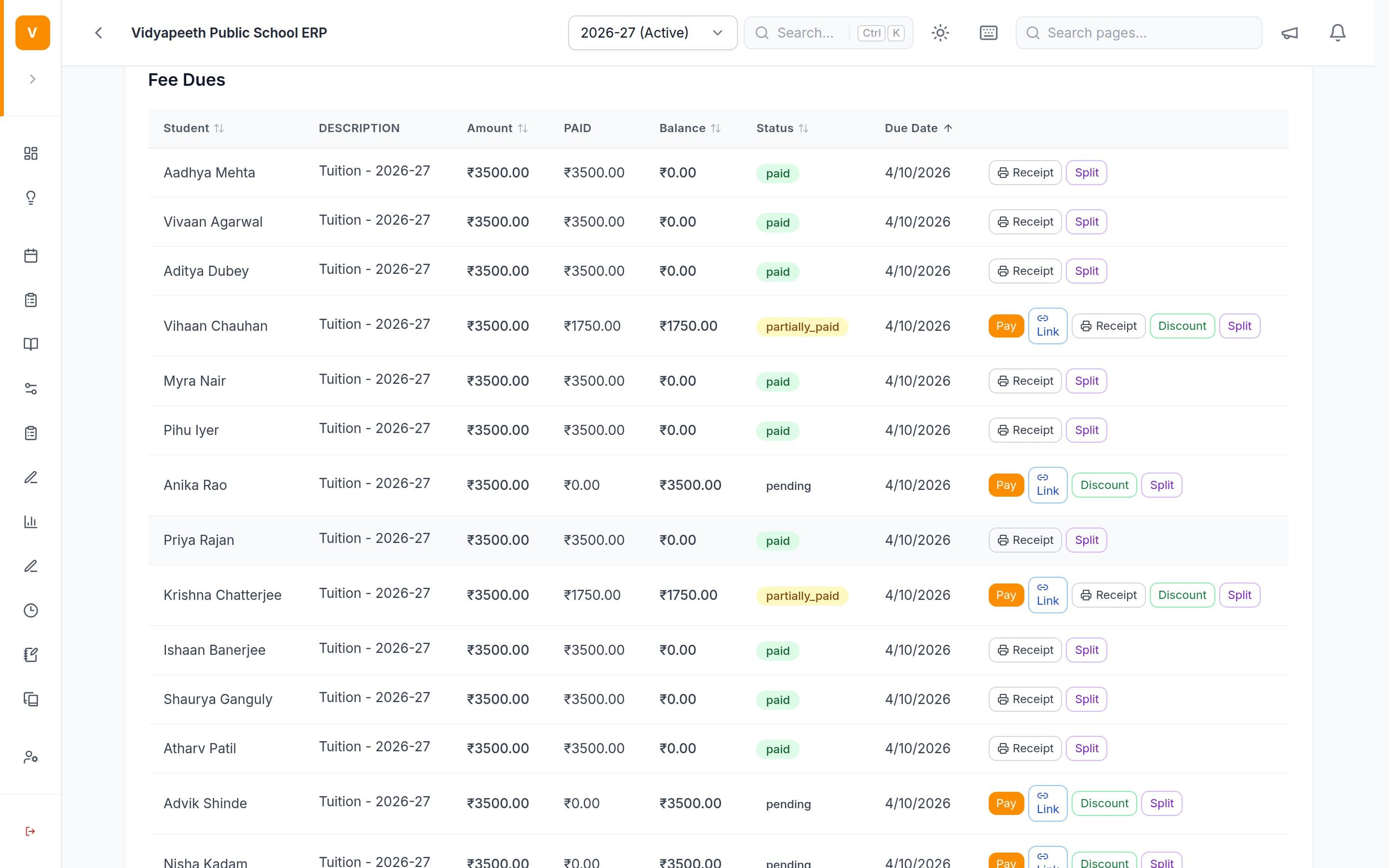
Define fee categories and per-class amounts and due dates, then generate the due for every student in a class in one action. Record a cash or cheque payment taken at the office against a student's due, updating the balance immediately.
- Online Payments
Parents pay fees online by UPI, card or net banking straight from the mobile app, and every transaction — online or manually recorded — appears in one running history with amount, date and status.
- Fee Receipts
Every payment taken at the office produces a numbered receipt showing the fee heads paid, any discount given and the balance left, ready to print or save as a PDF for the parent.
- Payment Links & Reminders
Generate a one-tap payment link for a specific fee due and send it to a parent, or send a reminder about an unpaid due. Overdue dues can also be chased automatically every night.
- Automatic Fee Reminders
Overdue dues are chased on their own: every night the system finds fees past their due date with a balance still owing and sends each parent a reminder with a payment link for that exact amount. Staff can also see the overdue list and run the whole round manually.
- Payment Gateways
Choose which online payment providers your school accepts — Cashfree, Razorpay, PhonePe or Paytm — and enter your school's own merchant account details, so money lands directly in your account.
Not available yet
- Fee concessions & discounts. Record a sibling discount, scholarship or staff-child concession against a student's fee due.
- SMS & WhatsApp delivery. Reach parents over SMS and WhatsApp as well as the app — useful before every family has installed it.
Step-by-step guides
Questions
Asked on every demo.
Can parents pay fees online?
Yes — by UPI, card or net banking from the app or a payment link. The office can also record cash and cheque payments and print a numbered receipt. Overdue dues are reminded automatically every night.
Do you hold our fee money at any point?
No. You connect your school's own Cashfree, Razorpay, PhonePe or Paytm account, and parents' payments settle directly into the school's bank. The money never passes through a StriveBit account, and we take no percentage of it.
Do notices and fee reminders go by SMS or WhatsApp?
Not yet. Today they reach parents in the app's inbox, as push notifications on their phone and by email. SMS and WhatsApp delivery is on our roadmap.
Can we give concessions or sibling discounts?
A discount can be shown on a printed receipt today. A concession that changes what a student owes — sibling, scholarship or staff-child — is on our roadmap.
See it running on
your school’s data.
Twenty minutes on a call. Then a demo built around your class list and fee structure.
Free demo · Up to three sessions · We come to your school in Chandigarh, Haryana and Delhi NCR